Creating an Inclusion/Exclusion Template
Introduction
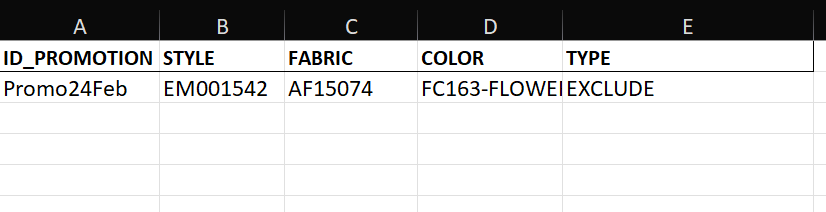
This subtopic outlines the procedure for creating an Inclusion/Exclusion template in Excel, designed to facilitate the addition of items to be included or excluded from the upcoming promotions under consideration.
Inclusion/ Exclusion Template
| Column | Field Description |
|---|---|
| ID_PROMOTION | This column is for the unique promotion ID. |
| STYLE | This column is for the product style. |
| FABRIC | This column is for the product fabric. |
| COLOR | This column is for the product color. |
| TYPE | Enter INCLUDE or EXCLUDE to specify whether the item is included or excluded from the promotion. |
Sample Template