Return
Introduction
The Return section in the OMS Orders module provides a centralized view of all return orders across online and store channels. It enables users to search, track return status, and review key details such as customer information, logistics, and refund amounts, ensuring efficient return processing and monitoring.
Return UI Reference Table
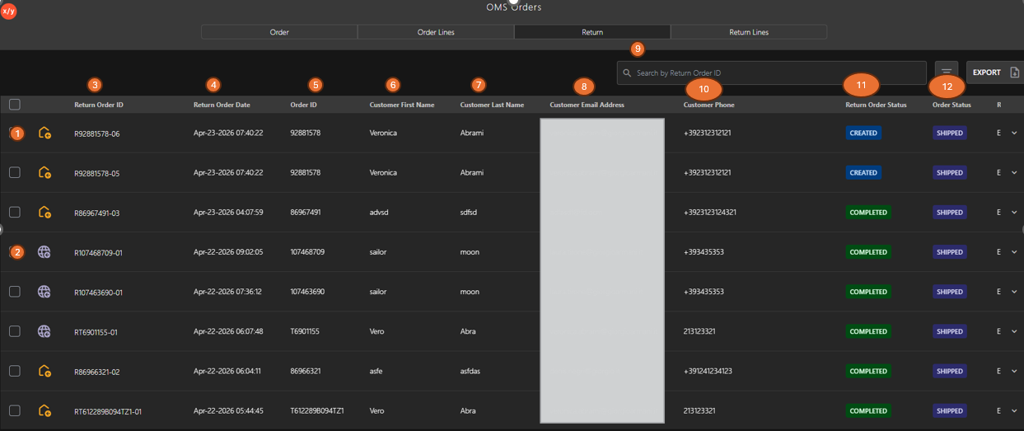
The following table describes the features that support common follow-up tasks.
| Callout ID | Feature | Description |
|---|---|---|
| 1 | Online Return Icon | Indicates that the return order originates from an online (eCommerce) order. |
| 2 | Store Return Icon | Indicates that the return order is initiated from a physical store. |
| 3 | Return Order ID | Unique identifier assigned to each return order. |
| 4 | Return Order Date | Date and time when the return order was created. |
| 5 | Order ID | Reference ID of the original sales order associated with the return. |
| 6 | Customer First Name | First name of the customer who initiated the return. |
| 7 | Customer Last Name | Last name of the customer. |
| 8 | Customer Email Address | Email ID linked to the return order. |
| 9 | Search by Return Order ID | Search field used to locate return orders using the Return Order ID. |
| 10 | Customer Phone | Contact number of the customer. |
| 11 | Return Order Status | Displays the current status of the return (for example, Created, Completed). |
| 12 | Order Status | Displays the status of the original order (for example, Shipped). |
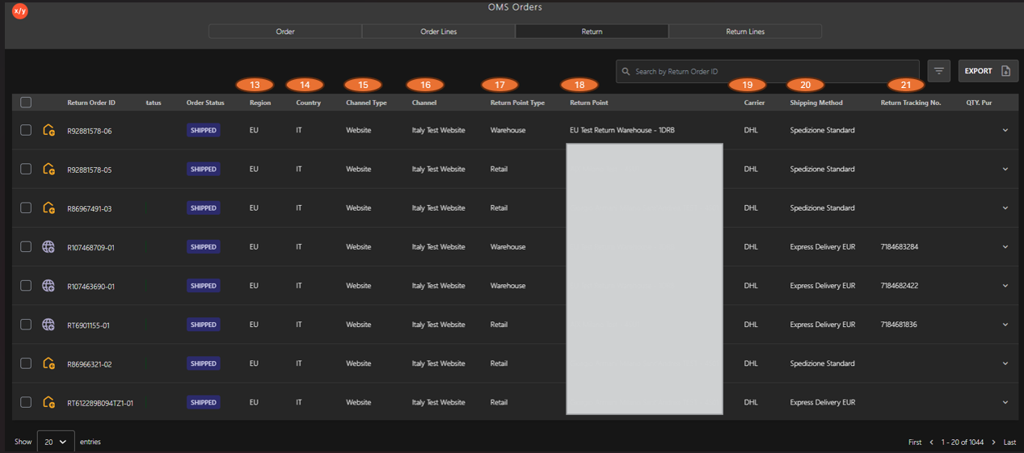
The following table describes the features that support common follow-up tasks.
| Callout ID | Feature | Description |
|---|---|---|
| 13 | Region | Displays the geographical region associated with the return order (for example, EU). |
| 14 | Country | Indicates the country where the original order or return is processed. |
| 15 | Channel Type | Specifies the type of sales channel (for example, Website, Store). |
| 16 | Channel | Identifies the specific channel or platform through which the order was placed. |
| 17 | Return Point Type | Defines the type of return location (for example, Warehouse, Retail store). |
| 18 | Return Point | Indicates the exact location where the return is processed. |
| 19 | Carrier | Displays the logistics provider handling the return shipment (for example, DHL). |
| 20 | Shipping Method | Specifies the delivery or return method used (for example, Standard, Express Delivery). |
| 21 | Return Tracking No. | Shows the tracking number assigned to the return shipment for monitoring. |
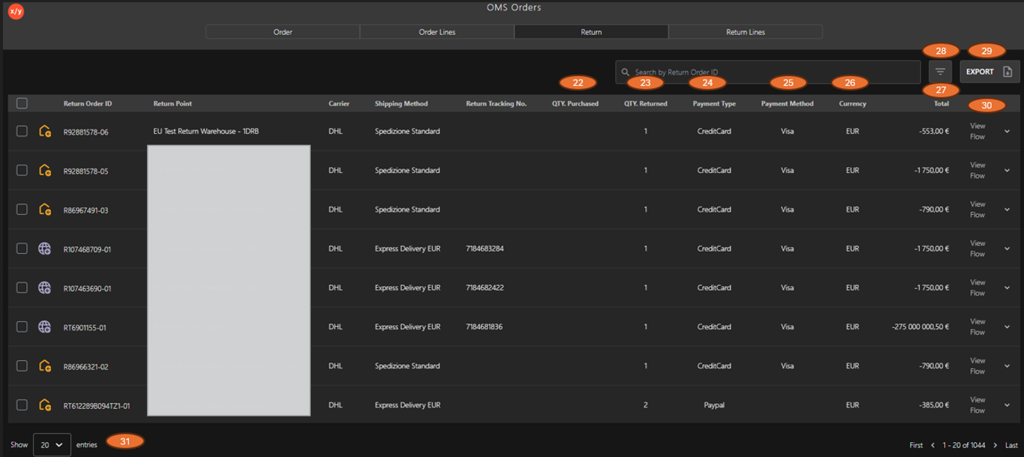
The following table describes the features that support common follow-up tasks.
| Callout ID | Feature | Description |
|---|---|---|
| 22 | QTY. Purchased | Displays the total quantity of items originally purchased in the order. |
| 23 | QTY. Returned | Indicates the quantity of items returned by the customer. |
| 24 | Payment Type | Shows the type of payment used for the order (for example, Credit Card, PayPal). |
| 25 | Payment Method | Specifies the payment provider or method (for example, Visa). |
| 26 | Currency | Displays the currency used for the transaction (for example, EUR). |
| 27 | Total | Shows the total return amount processed for the return order. |
| 28 | Filter Icon | Allows filtering of return order data based on selected criteria. |
| 29 | Export Button | Exports the return order details for reporting or analysis. |
| 30 | View Flow | Opens the detailed return item workflow for the selected return order. |
| 31 | Pagination | Click the dropdown to control the number of rows displayed per page for improved readability. |