Return Order Status
Introduction
The Return Status section provides a stage-wise overview of the return order lifecycle. It displays the current progress of the return by categorizing it into predefined statuses, enabling users to quickly identify where the return stands in the process. This helps in tracking, monitoring, and managing return operations efficiently.
Return Status UI Reference Table
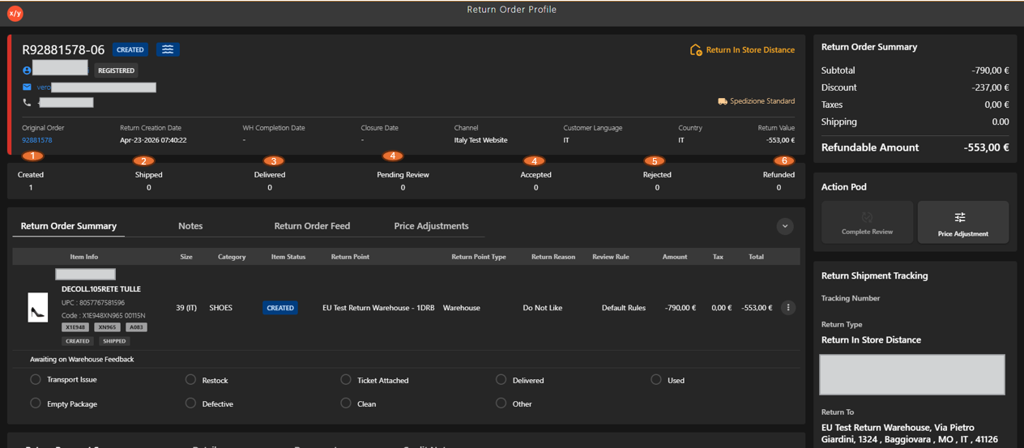
The following table describes the features that support common follow-up tasks.
| Callout ID | Status | Description |
|---|---|---|
| 1 | Created | Indicates that the return order has been successfully created in the system. |
| 2 | Shipped | Indicates that the returned item has been shipped by the customer or initiated for return. |
| 3 | Delivered | Indicates that the returned item has been received at the return location (warehouse/store). |
| 4 | Pending Review | Indicates that the returned item is awaiting inspection or validation. |
| 5 | Accepted | Indicates that the return has been approved after review. |
| 6 | Rejected | Indicates that the return request has been declined after evaluation. |
| 7 | Refunded | Indicates that the refund has been successfully processed to the customer. |