Managing Return
Introduction
The Return Order Profile provides a detailed view of a specific return order, combining customer information, return details, order references, and financial summaries in a single interface. It enables users to track the return lifecycle, review item-level details, and access key operational and financial data required for validation and processing.
Return Order Profile UI Reference Table
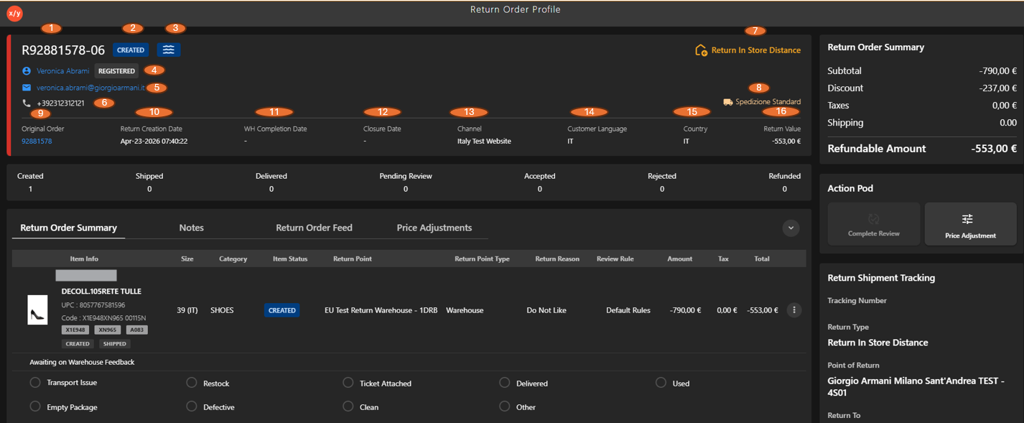
The following table describes the features that support common follow-up tasks.
| Callout ID | Feature | Description |
|---|---|---|
| 1 | Return Order ID | Unique identifier assigned to the return order. |
| 2 | Return Status | Displays the current status of the return (for example, Created). |
| 3 | Status Icon | Visual indicator representing the return status. |
| 4 | Customer Status | Indicates the customer type (for example, Registered). |
| 5 | Customer Email | Displays the customer’s email address. |
| 6 | Customer Phone | Shows the contact number of the customer. |
| 7 | Return In Store Distance | Indicates the return type or distance for in-store returns. |
| 8 | Shipping Method | Displays the return shipping method (for example, Spedizione Standard). |
| 9 | Original Order ID | Reference ID of the original order linked to the return. |
| 10 | Return Creation Date | Date and time when the return order was created. |
| 11 | WH Completion Date | Date when warehouse processing is completed. |
| 12 | Closure Date | Date when the return order is closed. |
| 13 | Channel | Channel through which the order was placed (for example, Website). |
| 14 | Customer Language | Preferred language of the customer. |
| 15 | Country | Country associated with the return order. |
| 16 | Return Value | Total refund amount associated with the return order. |