Awaiting on Warehouse Feedback
Introduction
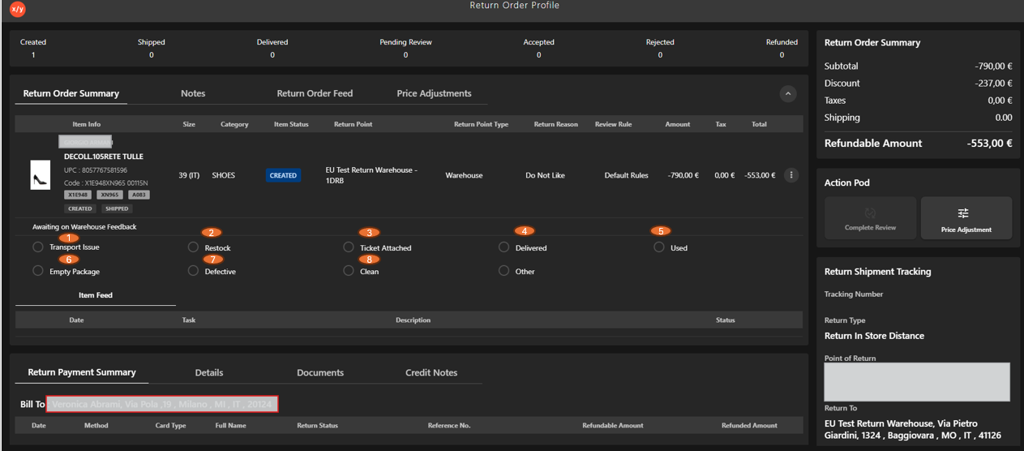
The Awaiting on Warehouse Feedback section is used to capture the inspection outcome of the returned item after it reaches the return location. It allows warehouse or store users to record the condition of the item and identify any issues observed during inspection.
Awaiting on Warehouse Feedback UI Reference Table
| Callout ID | Feature | Description |
|---|---|---|
| 1 | Transport Issue | Select when the item is damaged during transit. |
| 2 | Restock | Select when the item is in good condition and can be added back to inventory. |
| 3 | Ticket Attached | Indicates that a support or investigation ticket is linked to the return. |
| 4 | Delivered | Confirms that the returned item has been received at the return location. |
| 5 | Used | Select when the item shows signs of usage and may not be eligible for resale. |
| 6 | Empty Package | Select when the returned package does not contain the expected item. |
| 7 | Defective | Select when the item has a manufacturing or functional defect. |
| 8 | Clean | Indicates that the item is in acceptable condition after inspection. |
| 9 | Other | Select for any condition not covered by the listed options. |