Order
Introduction
The Order screen provides a unified view of individual customer orders, including key customer details, order attributes, and fulfillment status. Use this page to quickly search for orders by ID, review order metadata such as date, region, channel, and status, and perform actions like filtering and exporting order data for analysis and operational follow‑up.
Order UI Reference Table
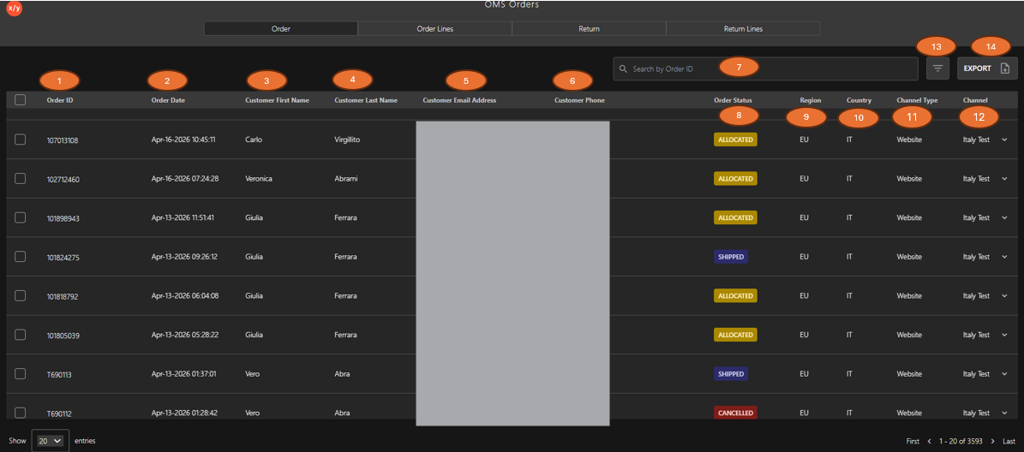
The following table describes the features that support common follow-up tasks.
| Callout ID | Feature | Description |
|---|---|---|
| 1 | Order ID | Display unique order identifier. |
| 2 | Order Date | Display order creation date and time. |
| 3 | Customer First Name | Display customer first name. |
| 4 | Customer Last Name | Display customer last name. |
| 5 | Customer Email Address | Display customer email. |
| 6 | Customer Phone | Display customer contact number. |
| 7 | Search Box | Enter an Order ID to locate and view specific order details. |
| 8 | Order Status | Display current order status (for example, Allocated, Shipped, Cancelled). |
| 9 | Region | Display order region. |
| 10 | Country | Display country code. |
| 11 | Channel Type | Display order source type. |
| 12 | Channel | Display sales channel. |
| 13 | Filter | Click Filter to refine order results. |
| 14 | Export | Click Export to download order data. |
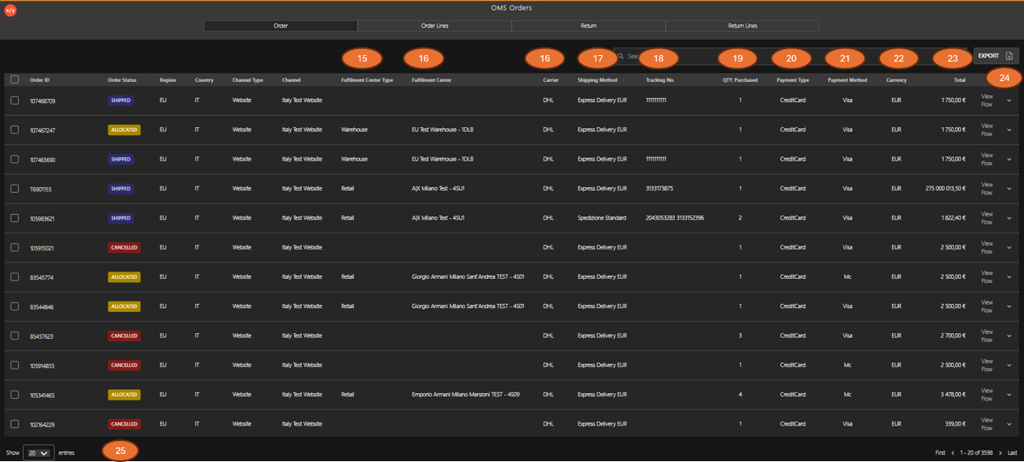
| Callout ID | Column / Element Name | Description |
|---|---|---|
| 15 | Fulfillment Center Type | Defines the type of location responsible for processing the order. |
| 16 | Fulfillment Center | Identifies the specific warehouse or store fulfilling the order. |
| 16 | Carrier | Indicates the logistics provider handling the shipment. |
| 17 | Shipping Method | Specifies the delivery service level selected for the order. |
| 18 | Tracking No. | Displays the shipment tracking identifier assigned by the carrier. |
| 19 | QTY. Purchased | Shows the total quantity of items included in the order. |
| 20 | Payment Type | Represents the category of payment used for the transaction. |
| 21 | Payment Method | Identifies the specific payment provider or card type used. |
| 22 | Currency | Indicates the currency applied to the transaction. |
| 23 | Total | Displays the total order amount, including applicable charges. |
| 24 | View Flow | Click to expand or collapse the child row to display order item details. |
| 25 | Pagination | Click the dropdown to control the number of rows displayed per page for improved readability. |