View Items
Introduction
The View Items tab in the View Shipment screen displays item-level details included in the selected shipment. It provides information about the product, pricing, discounts, and final totals to help users review shipment contents and validate financial values.
View Items – UI Reference Table
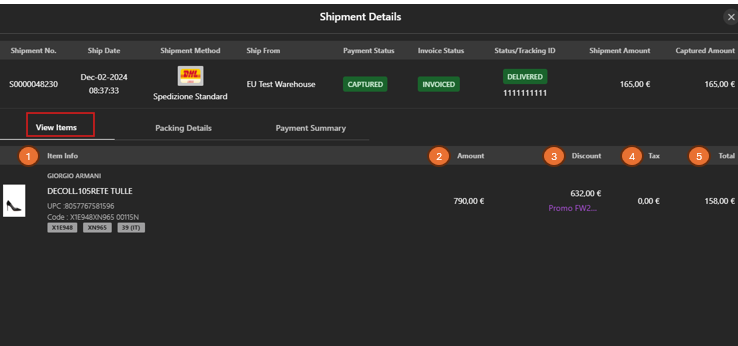
The following table describes the features that support common follow-up tasks.
| Callout ID | Feature | Description |
|---|---|---|
| 1 | Item Info | Display product details, including item name, UPC, code, and attributes. |
| 2 | Amount | Display the original price of the item before discounts. |
| 3 | Discount | Display the discount applied to the item. |
| 4 | Tax | Display the tax amount applied to the item. |
| 5 | Total | Display the final item price after discounts and taxes. |