Order Feed
Introduction
The Order Feed tab displays a chronological log of all activities performed on an order. It provides visibility into system events, user actions, and status updates throughout the order lifecycle.
Order Feed – UI Reference Table
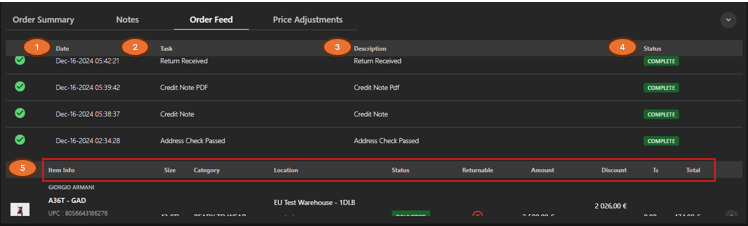
The following table describes the features that support common follow-up tasks.
| Callout ID | Feature | Description |
|---|---|---|
| 1 | Date | Display the date and time when the event occurred. |
| 2 | Task | Display the type of action performed (for example, Refund Complete, Credit Note). |
| 3 | Description | Display additional details related to the event. |
| 4 | Status | Display the current status of the event (for example, Complete). |
| 5 | Order Summary | Display a consolidated, item-level view of the order. |