Managing Order
Introduction
Order Information section provides comprehensive details regarding the specifics of the order, including the items purchased and the customer's delivery address, ensuring accurate processing and fulfillment of the order.
Order Information UI Reference Table
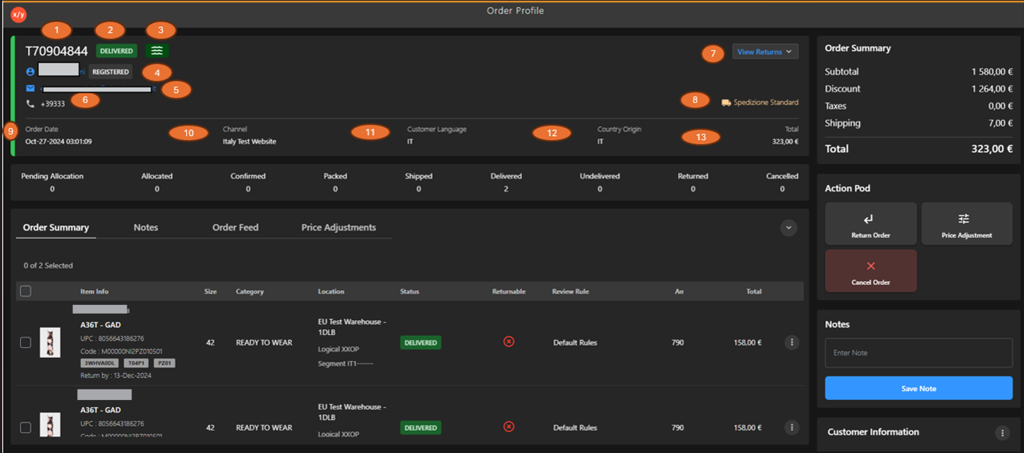
The following table describes the features that support common follow-up tasks.
| Callout ID | Feature | Description |
|---|---|---|
| 1 | Order ID | Display unique order identifier. |
| 2 | Order Status | Display current order status (for example, Delivered). |
| 3 | Order Actions Icon | Display order-related action options. |
| 4 | Customer Name | Display customer name associated with the order. |
| 5 | Customer Email | Display customer email address. |
| 6 | Customer Phone | Display customer contact number. |
| 7 | View Returns | Click View Returns to view associated return details. |
| 8 | Shipping Method | Display selected shipping method (for example, Standard). |
| 9 | Order Date | Display date and time when the order was created. |
| 10 | Channel | Display sales channel through which the order was placed. |
| 11 | Customer Language | Display preferred customer language. |
| 12 | Country Origin | Display country from which the order originated. |
| 13 | Order Total | Display total order value. |