OMS Order Feed
Introduction
The Order Feed is a live stream showing all real-time transactions processed by the OMS. It displays new sales, returns, delivery types, and fulfillment progress as they occur.
Order Feed UI Reference Table
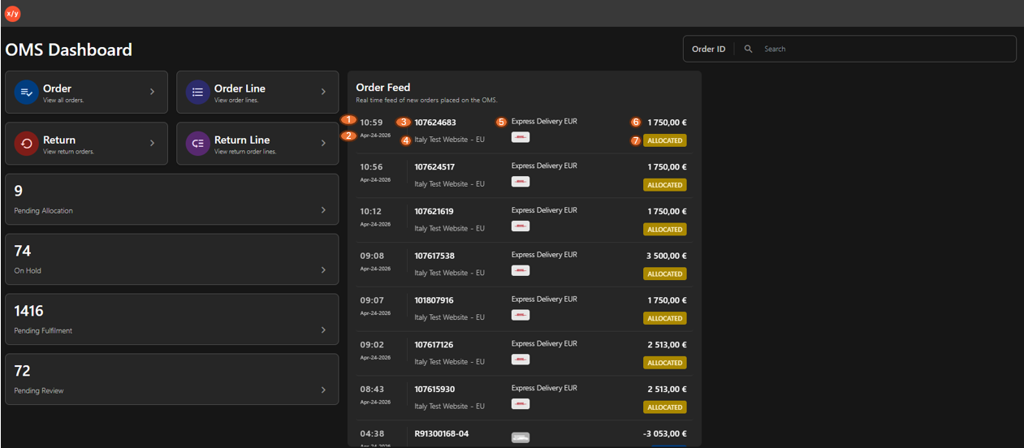
| Callout ID | Element Name | Functional Description |
|---|---|---|
| 1 | Time | Records the specific time the transaction was received by the system. |
| 2 | Date | Displays the calendar date associated with the order or return entry. |
| 3 | Order ID | Identifies the unique reference number for the transaction (e.g., standard Order IDs or "R" prefixed Return IDs). |
| 4 | Storefront Origin | Specifies the website or regional domain where the customer initiated the transaction. |
| 5 | Shipping Method | Details the chosen delivery service and the corresponding carrier logo. |
| 6 | Transaction Value | Shows the total monetary value, represented as a positive amount for sales and a negative amount for returns. |
| 7 | Status Badge | Provides a color-coded indicator of the current fulfillment stage, such as ALLOCATED. |