Pre-Shipment Dependency Task
Introduction
Before an order proceeds to shipment, the system validates a set of predefined dependencies to ensure the order is accurate, compliant, and ready for fulfillment. These checks are automatically executed as part of the order flow and must be completed successfully before downstream activities such as allocation, picking, and delivery tracking are initiated.
This section outlines how to review and confirm that all required dependencies are completed prior to shipment.
Steps to Review Dependencies Before Shipment
-
Navigate to the Order Flow section within the order details screen.
-
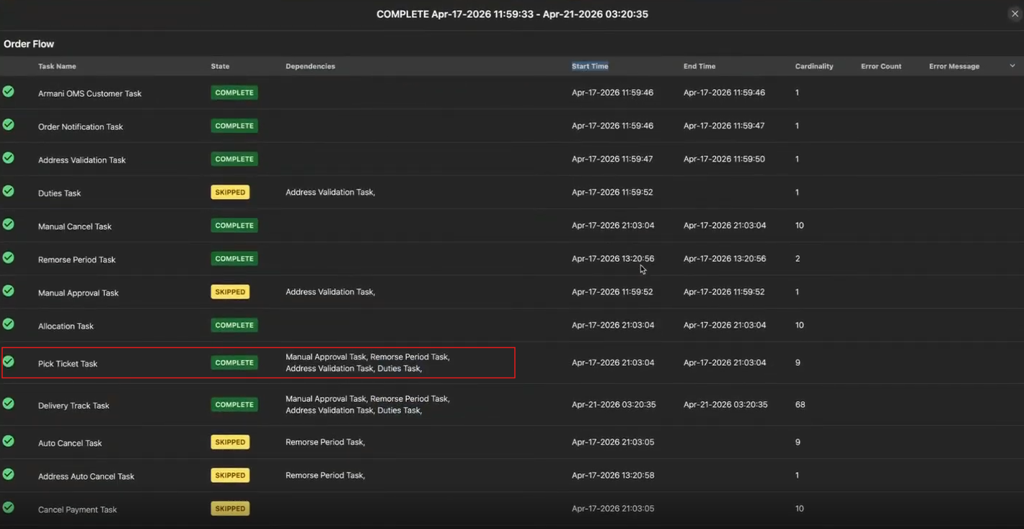
Go to the Pick Ticket Task.
-
Identify the following dependency tasks in the list:
- Address Validation Task — Confirms the shipping address is valid and deliverable.
- Duties Task (if applicable) — Calculates applicable duties and taxes for cross-border shipments.
- Customer Notification Task — Sends the order confirmation to the customer.
- Remorse Period Task — Ensures the cancellation window has expired or is completed.
- Manual Approval Task (if applicable) — Verifies that orders requiring additional review are approved before processing.
-
Review the State column for each task:
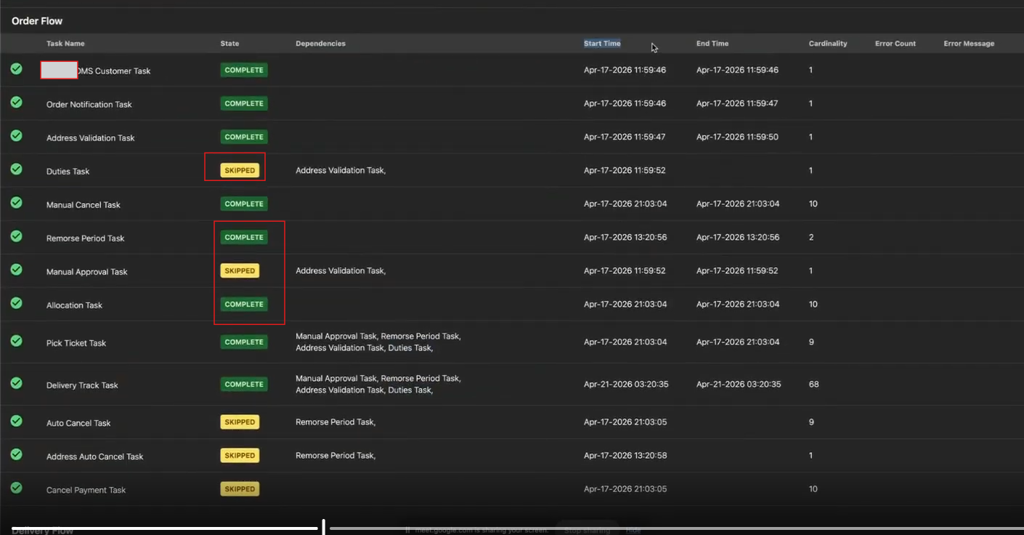
- Confirm the status displays Complete for all mandatory tasks.
- Verify Skipped is shown only for tasks that are not applicable.
-
Validate that no task displays an error or incomplete status.